Map OIDC roles and groups to S3 keys
OIDC tells S3 Web UI who someone is. This page explains how their identity-provider roles and groups decide which stored S3 connections they may select.
Create a stored S3 key in Settings → S3 keys and add a role or group grant. On every request, S3 Web UI compares the grants on the selected key with the authorities from the current OIDC login. A match makes the key available in the session picker; removing a role/group membership at the IdP takes effect after the user receives refreshed claims on a new login, while removing the grant in S3 Web UI takes effect immediately.
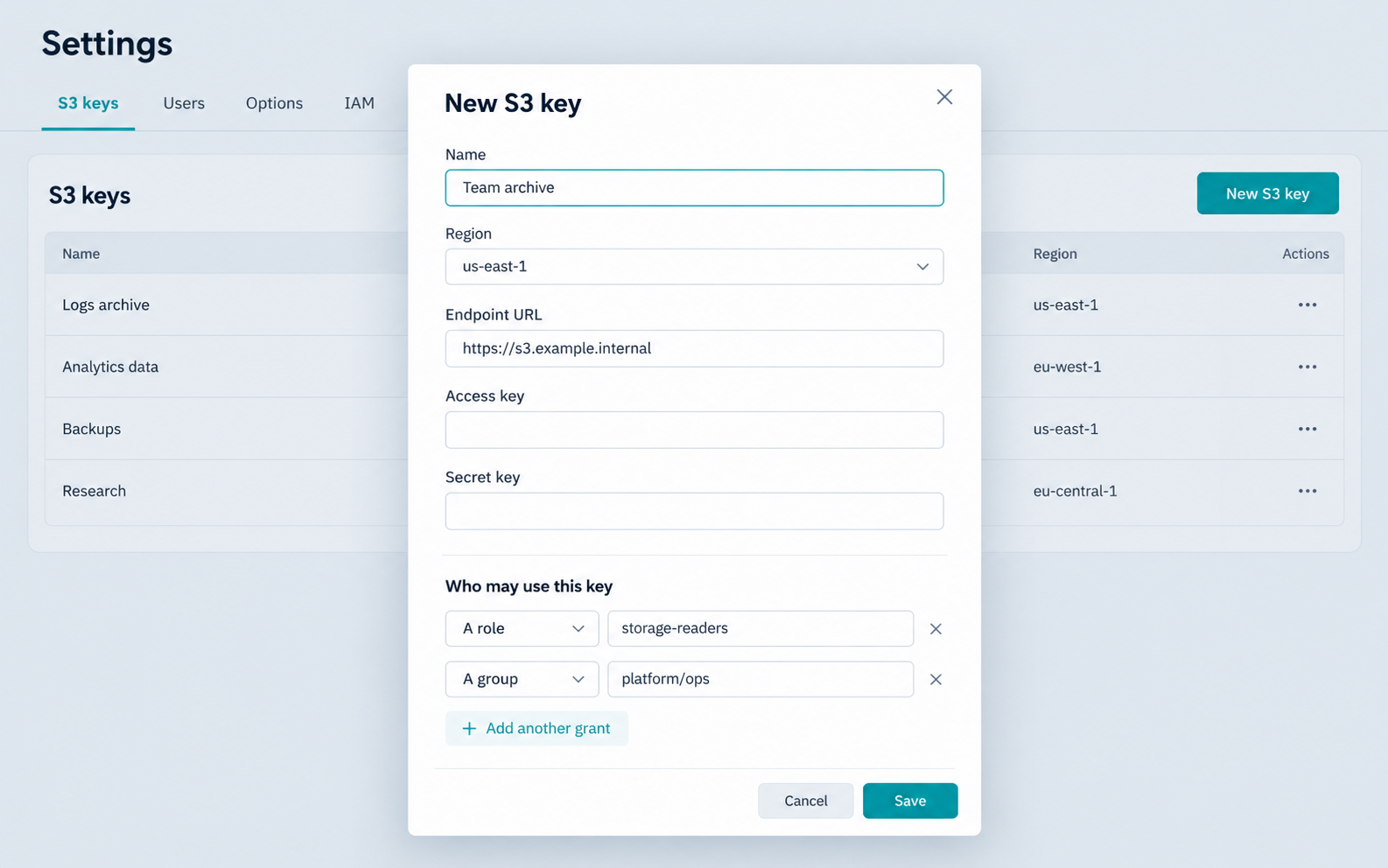
Illustrative configuration example. Field labels and grant choices reflect the application; the endpoint and names are sample values.
This is access mapping, not S3 credential provisioning: the configured key remains one shared, encrypted S3 connection. The user is allowed to select it because of their identity-provider membership. Use separate stored keys and grants when different teams need different S3 permissions.
The current claim mapping recognises these common Keycloak-style claim shapes, from either the ID token or the UserInfo response:
| IdP claim | Resulting grant type | Example value to enter in Who may use this key |
|---|---|---|
realm_access.roles: ["storage-readers"] | A role | storage-readers |
resource_access.<client>.roles: ["storage-writers"] | A role | storage-writers |
groups: ["/platform/ops"] | A group | platform/ops |
The application internally prefixes these values as ROLE_ and GROUP_; enter the unprefixed role or group value in the Settings form. Leading / characters in group paths are ignored, so both /platform/ops from the IdP and platform/ops in the grant refer to the same group.
For another IdP, configure its claim/mapper settings to emit one of the shapes above as an array of strings. Arbitrary claim names and nested role formats are not configurable in the UI today. A custom IdP mapper or a future application extension is needed when the provider cannot emit realm_access.roles, resource_access.*.roles, or groups in this form.
Authelia and other providers that need a scope
Authelia only releases the groups claim when the client is allowed the groups scope and the application requests it. Set OIDC_ADDITIONAL_SCOPES=groups (or OIDC_PROVIDERS_0_ADDITIONAL_SCOPES=groups) in S3 Web UI; Authelia's default client scopes already include groups. S3 Web UI reads the claim from both the ID token and the UserInfo response, which is where Authelia delivers it by default. The Keycloak and Authelia examples show the whole setup.
Application administrator status is deliberately different: it is read from the local S3 Web UI user record. An IdP role named admin can match an S3-key role grant, but it cannot make a person an S3 Web UI administrator.