Review the activity history
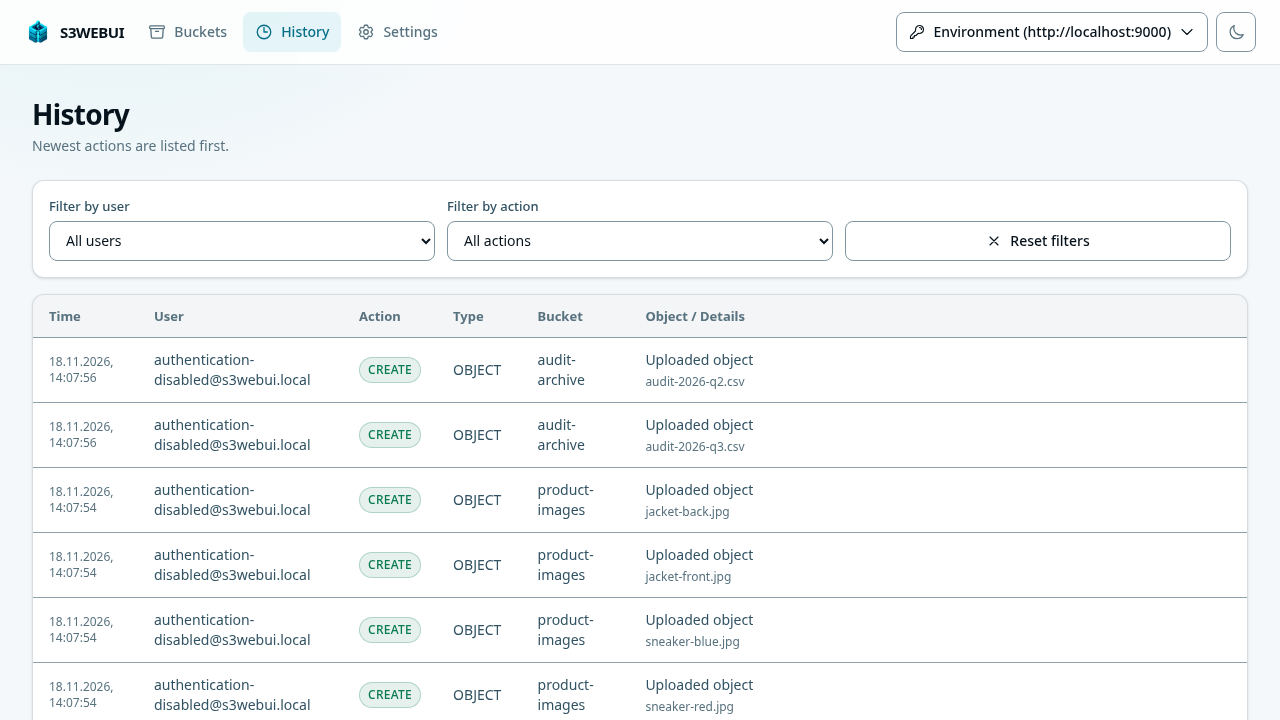
Open History to review actions performed through S3 Web UI. The table lists newest entries first and can be filtered by user and action.
Visibility and retention
- Administrators see every audit entry.
- Other users see only entries recorded for their own application identity.
- The application retains the newest 1,000 entries and removes older entries as new actions are recorded.
Each entry includes the timestamp, user, active S3 key, action, resource type, bucket, object key where applicable, and result details. Audit history persists in the application database, so it survives a normal restart when the database is persisted.
Recorded activity
The history records S3 Web UI actions such as bucket/object uploads, downloads, renames, copies, moves, deletes, bucket policy and CORS edits, and IAM mutations. Failed audited operations record an error detail when possible.
It is not a storage-backend audit log. Changes made with another S3 client, the AWS console, a provider CLI, or a provider-specific administration console do not appear here.
Investigation workflow
- Filter by a user to see what that person did through the application.
- Filter by an action such as
DELETE,UPLOAD,MOVE, orEDIT. - Check the active credential and resource fields before restoring data or changing permissions.
- Use the storage provider's own audit trail as the source of truth for activity outside S3 Web UI.
For a destructive-operation workflow, see Storage workflows. For IAM changes, see IAM management.